










Skip to content
Zapme

Global phone numbers

Phone numbers, that work alongside your existing number.

No SIM cards, No eSIMs & No Global Roaming. All directly from the app!

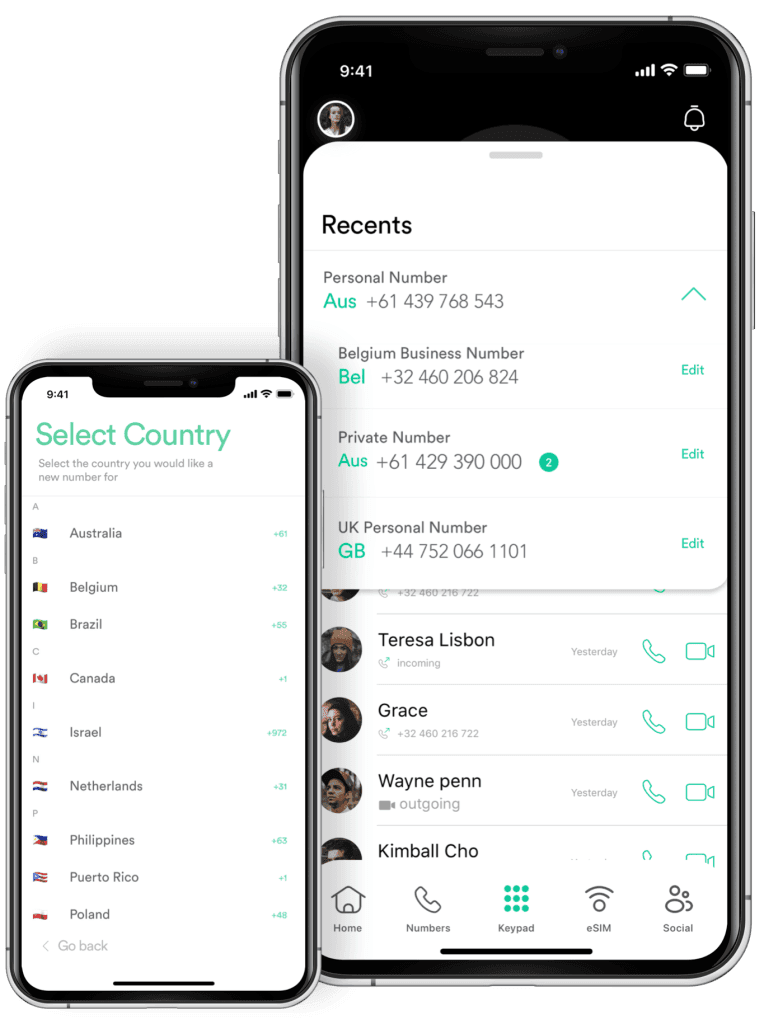
Global numbers in the Zapme app

Global numbers, for every part of your life

Number plans from US$4.95. Keep every number active and switch between them in a tap.

Get a number in minutes

  1. 01

    Open Numbers/Data

    Log in to Zapme and tap the Numbers/Data icon.

  2. 02

    Choose country & plan

    Select the country and the number plan that suits you.

  3. 03

    Confirm & go

    Review, pay, and your number is live. The person you call doesn't need Zapme.

Global number FAQs

What is a Zapme global phone number?

A global phone number from Zapme lets you make and receive calls, SMS, and OTP verifications anywhere in the world, as if you were still in your home country.

Why are global numbers useful for students, travelers, and businesses?

You can receive bank OTPs, two-factor codes, and important messages from services that don’t support international numbers.

Can I make and receive calls using Zapme?

Yes. Zapme numbers support voice over data (VoIP), letting you place and receive calls in the app — great for international use and local presence.

Do Zapme numbers work for SMS verification and OTPs?

Yes. Zapme supports most banking apps, email providers, and social platforms like WhatsApp, Gmail, and Telegram for SMS-based verification and authentication.

Can I manage multiple numbers through Zapme?

Yes! You can manage multiple global phone numbers and eSIM plans in one account — perfect for managing a business or juggling personal and work lines.

Can I purchase multiple phone numbers?

Yes, Zapme allows you to buy multiple numbers for multiple countries all linked to your Zapme account and any existing mobile telephone you have. You can also switch between those numbers any time while keeping them all active and being able to make and receive calls, as normal. It’s magic!

How do I purchase numbers from Zapme?

To purchase numbers from Zapme, please follow these steps:

  1. Log in to your Zapme account
  2. Tap ‘Numbers’ in the menu at the bottom of the app, then the phone + icon above the home button. You should be able to see an option to purchase multiple numbers.
  3. Tap ‘Get a new global number & data!’ button
  4. Select the country and the number you want to purchase
  5. Choose the desired plan and whether it’s 1 month or a rolling 1 month subscription (there are no lock-in contracts in subscriptions)
  6. Click the ‘Confirm’ button
  7. Provide any Know Your Customer (KYC) identity verification documents that we are required to request by applicable law
  8. Review your order and click on the ‘Process Payment’ button
  9. Enter your payment information, then click ‘Pay’ or ‘ Subscribe’ depending on your purchase.

More answers in the FAQ centre and Knowledge Centre.

Download your Zapme app today.

Zapme.co’s eSIM technology contributes to environmental conservation by eliminating the need for physical SIM cards. This reduction in plastic usage aligns with global efforts to minimize waste and promote sustainable practices.